« November 2006 | Main | January 2007 »

December 30, 2006

Bossa Automator

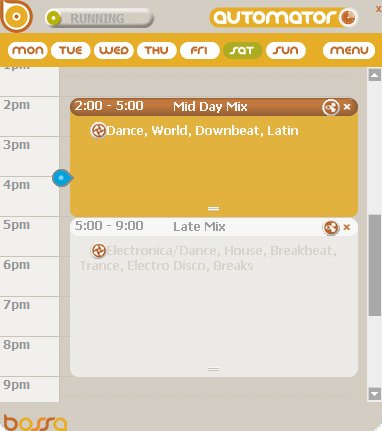
Check out the Bossa Automator at work.

I just set up a new schedule for a really cool gift store here in Hood River called Twiggs. They have about 3000 songs on their computer but they are all different genres and playing their music on random wasn't making for a great shopping experience since they never knew what to expect next.

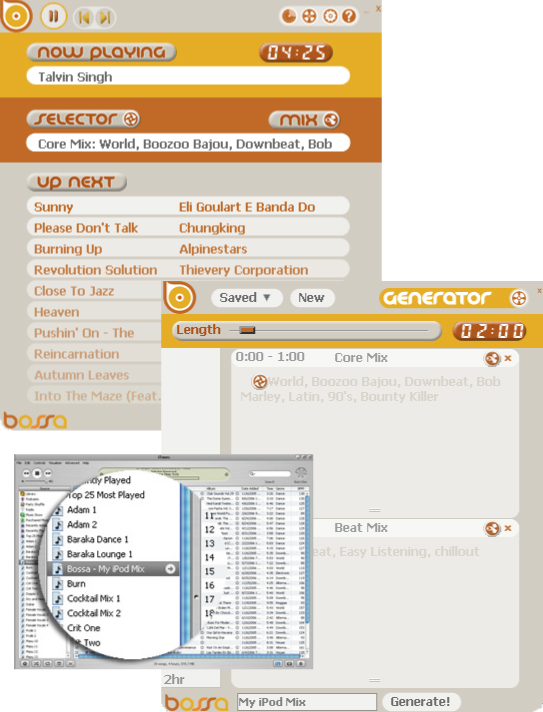
So this is where the Bossa Automator comes in. We set up a schedule of mellow down-tempo, jazz and easy listening in the morning and then picked up the pace as the day went along. As you can see from the Automator schedule pictured here, the Mid Day Mix from 2 to 5 pm features Dance, World, Downbeat and Latin music. Then at 5 pm it automatically changes to the Late Mix which includes Electronica/Dance, House, Breakbeat, Trance, Electro Disco and Breaks. Once the schedule is made and the Automator is running you don't have to do a thing. Bossa just pulls the music from your computer according to your schedule. For Twiggs, the schedule is set for every day they are open. Different opening or closing times are all set in the daily schedule. The music is on before anyone even comes to work and turns off automatically when they go home at the end of the day.

The Bossa Automator allows you to be in full control of your music. Check out the full scoop on the Automator at www.mybossa.com
Bossa-Music-Automator-Timer.jpg

December 21, 2006

Bossa Selectors

Bossa - Lab - Selectors

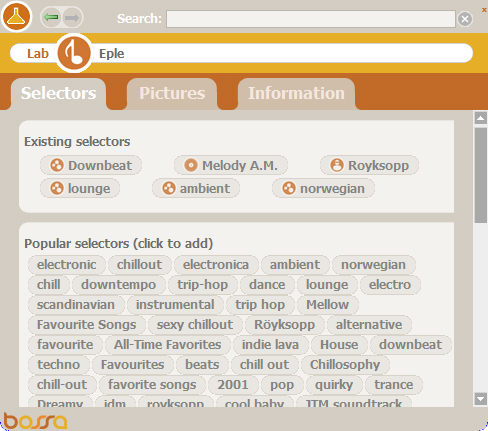
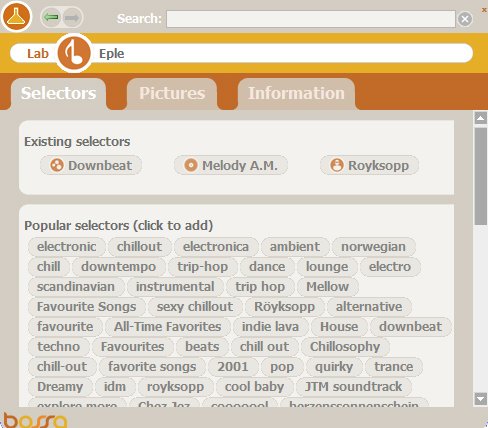
One of the coolest features of the Bossa Lab is the ability to find Selectors for your songs online. Besides the ID3 tags that you already have for your songs, the Bossa Lab finds tags, or Selectors as we call them, that other people use for their songs. Check out the following image of the Lab that shows the Bossa Selectors of the Royksopp song that's currently playing in Bossa.

Bossa-Lab-Selector_1.jpg

You can see the existing Selectors at the top. The song is by Royksopp. The album is Melody AM and the genre is Downbeat. Underneath you can see all the popular Selectors that the Bossa Lab found online. By clicking on an additional Selector you can add them to Bossa. As you can see in the next image, I added Lounge, Ambient and Norwegian. Now when I make a mix or a playlist, I have multiple Selectors for this Royksopp song. So if I make a Mix with just Norwegian music, I can select "Norwegian" and this song will play in that mix. Additional Selectors allow you to define and narrow your mixes and playlists much more precisely.

Bossa-Lab-Selector_2.jpg

December 16, 2006

Bossa Playlist Generator

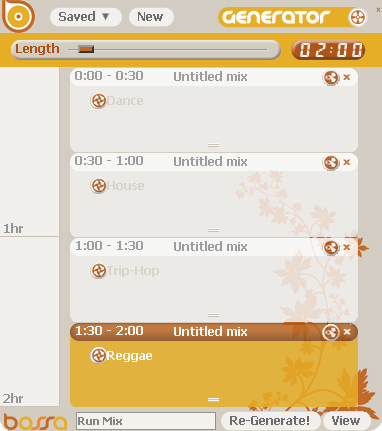
We've been getting a great response on the Generator function in Bossa. By using the Generator you can quickly make a playlist that's automatically placed in iTunes for easy download to your iPod. I made a quick playlist before a run this morning. I planned to run for about 2 hours so I selected some upbeat and fun music to keep me motivated during my run. I picked 4 different genres in 30 minute increments. As you can see from my schedule, I picked Dance, House, Trip Hop and Reggae for my playlist and then named the playlist "Run Mix" I saw the playlist being generated in iTunes and then downloaded it to my iPod and took off for my run. I don't think it even took 30 seconds from start to finish. Check out the set up in the Generator as well as the playlist it created.

playlist-generator.jpg

"Run Mix"

1. We Interrupt This Program (Interrupted Vocal Mix) – Coburn - The Mix 2006 - Dance
2. Get A Life [radio Edit] – Freestylers - Get A Life - Dance
3. Tribulations (Tiga's Out Of the Trance Closet Mix) - Lcd Soundsystem - Twisted Disco - Dance
4. Come To Me - Holden & Thompson - Sasha Fundacion - Dance
5. Drop The Funk (Funk Distraction Mix) – Primo - Miguel Migs 24th St. Sounds - Dance
6. Sweet Troubled Soul (Richard Morel Vocal Mix) – Stellastarr - Sweet Troubled Soul - Dance
7. Pure (Mig's Remix) - Blue Six - House
8. Clubtools (Bob Sinclar Mix) – Jestofunk - House
9. Standing in my Suitcase - Olivier Gaudin - House
10. Wonders Never Cease (A chicken lips special 12" version) – Morcheeba - House
11. Song for Sharma - Soul Central - House
12. Five Man Army - Massive Attack – Collected - Trip-Hop
13. Inertia Creeps - Massive Attack – Collected - Trip-Hop
14. When I Fall (In Love) - Abacus and Esthero - Trip-Hop
15. She Makes Me Wanna Die (massive Attack Remix) – Tricky -Trip-Hop
16. Joy Luck Club - Massive Attack – Collected - Trip-Hop
17. Love Generation - Bob Sinclair - 2006 Fifa World Cup Hits - Reggae
18. Africa Unite (Will.i.am Remix) - Bob Marley - Africa Unite The Singles Collection - Reggae
19. Destination Unknown - Black Uhuru - The Dub Factor - Reggae
20. Dubolition - Kieser.Velten - Hi-Fidelity Dub Sessions Chapter Two - Reggae
21. Confrontation - Damian 'Junior Gong' Marley - Welcome To Jamrock - Reggae
22. What You Gonna Do - Horace Andy - From The Roots - Meets Mad Professor - Reggae

These are songs that are in my music library. The Bossa Generator just pulls the songs out of the library and randomly creates playlists according to the specs I placed in the Generator. It's that easy!

You can post your playlists on the Bossa Forum under "Your Mixes". See what playlists other Bossa users are creating and keep up to date with all the latest tips and tricks in the Bossa Forum as well.

Start Generating!

December 06, 2006

Bossa is now available

We've been working hard on Bossa for over a year now and we're excited to launch the first trial version.

The Bossa player is unlike anything you've experienced on your computer before musically. Bossa works with iTunes to give you new ways of viewing your music and selecting what you want to hear. Besides playing your music, Bossa will Generate playlists for you that you can download to your iPod. Bossa can also Automate your music for you, so what you want to hear comes on when you want to hear it. The Bossa Lab allows you to download Tags and Selectors for your music, check artist pictures of the music you're playing as well as information about the artists through Wikipedia.

This is our first trial version and we would love to have you try it and give us any feedback.

To download or read more info on Bossa go to: www.mybossa.com

Cheers,

Barry and Mike


blog-pic.jpg

December 03, 2006

Bossa "Generator"

Here's another sneak preview of one of Bossa's features:

Generator.jpg

Easily create playlists to download to your iPod

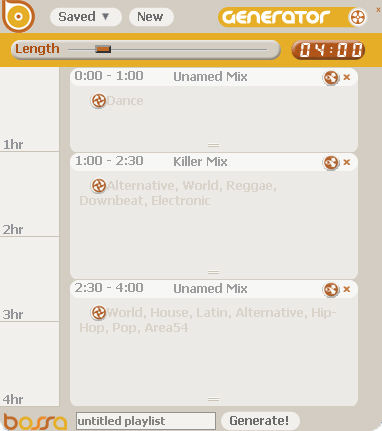
Generate a timed playlist by specifying what you want to hear and for how long.
Bossa can create a playlist for you anywhere from 15 minutes in length to 24 hours! Click and drag the slider to set the length of the playlist you want. Then click inside the Generator to set specific timed events for your playlist.

Here you can see that the first hour “Dance” is selected. Then 1 ½ hours of the “Killer Mix” which includes the genres; Alternative, World, Reggae, Downbeat and Electronic. The last 1 ½ hours it’s music from the unnamed mix consisting of other genres.

When you’re done selecting the music you want in your mix, click “Generate” and your playlist will be generated in iTunes. From there you can easily load it onto your iPod or play it in iTunes.

We'll be releasing a beta version very soon. Sign up to get the latest information www.mybossa.com