« December 2006 | Main | February 2007 »

January 12, 2007

New version of Bossa available (version 1030)

Today we released a new version of the Bossa preview.

This is version 1030. We have made many changes "under the hood" to increase performance and fix some issues that have been brought to our attention during this preview period.

In addition we have extended the preview period until the end of the month.

This is a good time to talk about versions and the auto-update procedure in Bossa.

How do I know what version of Bossa I am running?

The version number can be found by starting Bossa, clicking on the "Settings" icon in the top right of the player window and then selecting the "About" tab. You should see a screen something like the following:
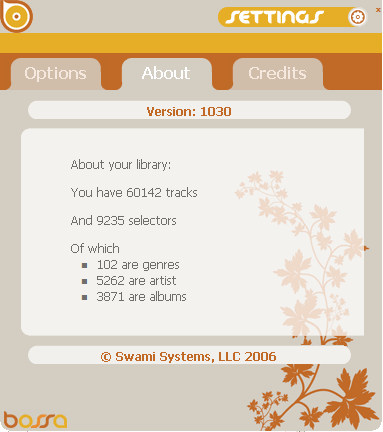
bossa settings: about screen

In addition to the version number at the top you will see some statistics about your music library.


Auto updating

Bossa downloads are small and quick. The auto update process is designed to be quick and seamless, you should be able to update your version of Bossa without interrupting your music playback.

New releases or updates are automatically picked up by Bossa and you will be notified the next time Bossa starts. You will see a message something like the following:
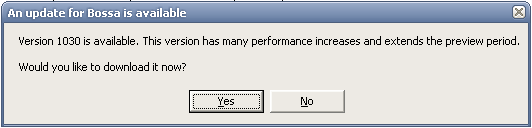
bossa update notification


if you click on "yes" a browser window will appear to download the new version of Bossa. Save the downloaded file to your computer and run it when the download completes. This will quickly install the updated version on your machine. At then end of the process you will be asked if you want to restart Bossa. Click yes and Bossa will restart and continue programming your music from where it left off.

As always, if you have any questions with any of this use our new support forums or email us at support@mybossa.com.

Thanks
January 07, 2007

Bossa Lab - Artist Information

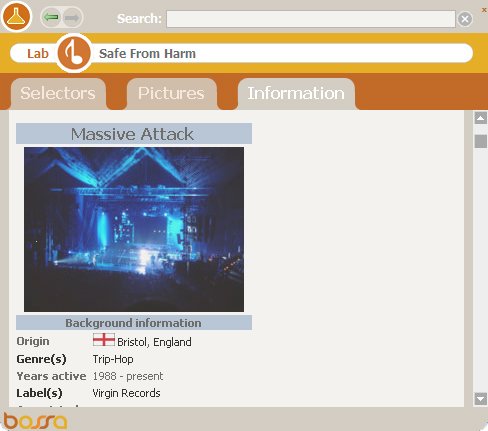
A lot of you have been letting me know how much you like looking at artist pictures in the Bossa Lab, but another great function of the Bossa Lab is the information tab. By clicking on information, Bossa automatically searches for the artist of the current song that's playing in Bossa through Wikipedia. As you can see in the image below, I'm playing "Safe from Harm" from Massive Attack. All the information about Massive Attack automatically gets pulled from Wikipedia into the Bossa Lab. Before Bossa, I would have to open my web browser separately to look up a song or an artist I was listening to. Now Bossa makes it all automatic. Do you hear a song you like and want more information? Want to see artist pictures? Want to see what other selectors or tags for a song people are using? It's all right there for you in the Bossa Lab. The Bossa Lab is just another way that Bossa lets you do more with iTunes.

Bossa-Lab-Artist-Informatio.jpg

January 03, 2007

Bossa Lab - Artist Pictures

As many of you noticed recently, Flickr changed some settings in their API which made the Bossa Lab search incorrect servers for artist pictures. Everything has been straightened out now so when you click on artist pictures in the Bossa Lab, pictures of whatever artist you are playing in Bossa will show up in the Lab window.

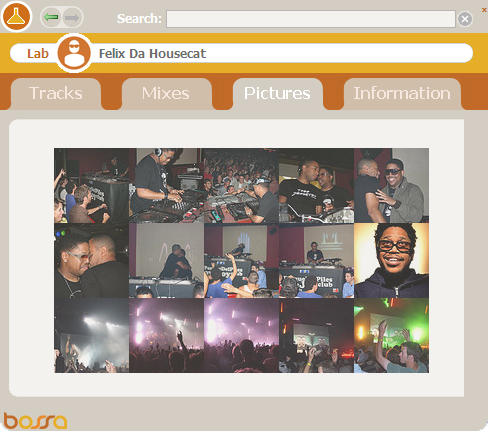
This is also a good opportunity to talk a bit more about the great functions built into the Bossa Lab. As you can see from the image below, I'm playing a Felix Da Housecat track and pictures of Felix are pulled up into the Lab via Flickr. These are all the most recent pictures that users have posted and tagged with Felix Da Housecat. You can click on each image to enlarge or simply sit back and watch them in a slideshow. When the next song starts to play in Bossa, the Lab will automatically retrieve new pictures of that artist.

Bossa-Lab-Artist-Pictures.jpg

Not only does the Bossa Lab do a great job finding pictures, it also pulls artist information via Wikipedia, shows you what music you have in your mixes and finds tags online to help you with your song organization.

Bossa simply lets you do more with iTunes. Check it out at www.mybossa.com